10:44 PM
iKnow! Quiz for TOEFL courses
5:15 AM
Gadget address: http://tinyurl.com/iKnowQuiz
To play quiz with this gadget, follow these steps:
1. Login to iKnow! site
2. Select any course or list
3. Click Items tab
4. Scroll to the bottom of the screen, you would see Feeds, click on it and copy XML link.
5. Paste this link to the gadget setting and run
After finishing, the quiz looks like that:
If you don't want to do the configuration, you could run two gadgets:
iKnow! Quiz for Japanese Core 2000
iKnow! Quiz for Japanese Core 6000
For example:
This is a quiz for Japanese Core 2000: Step 1
And this is a quiz for Japanese Core 6000: Step 1
You can run these gadgets in your sites or blogs but I think they should be run in iGoogle page so that your learn history will be saved.
6:03 AM
To install the add-on, follow these steps:
1. Open your FireFox browser, click to this link https://addons.mozilla.org/en-US/firefox/addon/9645 and open it with FireFox browser. This dialog will appear.
![[Image]](https://lh3.googleusercontent.com/blogger_img_proxy/AEn0k_vQi_Q-qmRLG0qu_2WMpRmXHKKWCSF6iTCwiT9T1G4HoGmz96v_l4bDH9GH3xPeOyCWJ8OxXInIxiCcGX9oZQx01Mlejq9AbaOZHwEsa-xEsU1L0VsWPA=s0-d)
Click the button Install Now as described above.
2. After installing successfully, the new dialog will appear:
![[Image]](https://lh3.googleusercontent.com/blogger_img_proxy/AEn0k_vD7oGWcNZb3DzxgjnGFN5qe4MgKplwZ1ONv16iTjhBvApws56CXGg6US0hAPPpId9PF9tsZ8VZbktKQye_SGDRm3d-QpMa6uPI3UddgRT4U68oTBPcFzY=s0-d)
Click Restart FireFox to restart your FireFox browser.
3. After your FireFox browser is restarted, you notice that there's a new icon (red circle in the following picture) in the status bar
![[Image]](https://lh3.googleusercontent.com/blogger_img_proxy/AEn0k_spaPzUvYefX7HXv9Yf8_5t2uH1c-lq26kMCupV1QicdylNh3HNfy-f2om3gfy40lO45qSe2o9KnIL5k1dXk6NH-X-0iXz10jlu6BCkIMe9m7TwdcBFgAo=s0-d)
4. Click on it, a pop-up menu will be opened:
![[Image]](https://lh3.googleusercontent.com/blogger_img_proxy/AEn0k_uv057ZrYD7ATObjpJdRm3Tiswqr7wjpTO10Ihsmj1d5C4CMq7Of--M-jF2X3u87wMHKmHvR7Y7jflz1GEe44ZFHGvAYtw7mbZdEz2SiKOq9SUl-Kw6XrU=s0-d)
![[Image]](https://lh3.googleusercontent.com/blogger_img_proxy/AEn0k_tMshd7wJUwq8z0G8pfHhZ1TchSYOim6A4ZlKIszQh3TvPWuaiZY4I62GHjAy96-Nn1Qvk2e9Mu28THwFNcmLDC02gNx6QUVIuuQB82vKgl0-rosq_WK1g=s0-d)
I checked Load sentences to allow the add-on to load sentences related to the word (if any)
I checked Load sentence sound to allow the add-on to load sound of sentence related to the word (if any)
I checked Load sentence image to allow the add-on to load image of sentence related to the word (if any)
Click OK to finish.
6. OK, it's time to use it.
Open any web page, for example iKnow! website: www.iknow.co.jp
Press Ctrl button and click Right Mouse at the same time on the word you would like to look up.
For example, I press Ctrl + Right Mouse on the word spread, this screen will appear:
![[Image]](https://lh3.googleusercontent.com/blogger_img_proxy/AEn0k_vbX6NQpPex9NO3R6ckI8XSqu614S8xIkTY9DlUlEvJKb-xoQ2sMhtAj2RX8A8MwPqa6a2zgxw-hBIWfJi-97DEAciywOPnnO78D9BF6E4dJvdbOv0bhJY=s0-d)
Another example, I open BBC website and look up for the word negotiation
![[Image]](https://lh3.googleusercontent.com/blogger_img_proxy/AEn0k_uhNO0ZloDUDWlNRKO8fWsfnXwW2fimR1rOlZu4IBPTuLnRA0yEeZaveuH9TymzagpLs2zybgoHvfeCqXfxmo2iRAg32NrVMeIFPPaFQgnIJjsupda8ht8=s0-d)
Thanks and hope you enjoy it.
7:04 AM
このガジェットはiKnowの単語を調べるのに使われています。
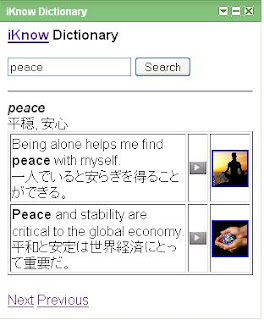
簡単ですが、英語と日本語を勉強することができます。
このリンクhttp://www.tinyurl.com/iKnowWord置きました。iGoogleを入れるのにこのリンクを参考してください。
To be able to use this gadget, follow these steps:
1. Go to the link above
2. Make some settings by checking Show Japanese sentences or Show English sentences as well as Width and Height
3. Add the gadget into Google page or
Generate code and copy it into your website. Enjoy!
8:29 AM
iknowのAPIで新しいガジェットを作りました。
このガジェットはクイズのために使っています。
簡単ですが、英語と日本語を勉強することができます。
www.tinyurl.com/iknowQuiz

To be able to use this gadget, follow these steps:
1. Select any course in iknow
2. Go to item tab
3. Go to Feeds
4. Select XML
5. Copy XML URL
6. Paste this URL to iknow URL in the gadget
7. Add the gadget into Google page or
Generate code and copy the code into your website
For example, XML URL of the course まずは!TOEIC基礎・リーディングセクション is http://wapi.iknow.co.jp/lists/521/items.xml. Remove ‘w’ out of the link, the link becomes http://api.iknow.co.jp/lists/521/items.xml
Paste this link into the iknow URL of the gadget and use.
This gadget is very simple but may help you to review the words you have been learning in iknow courses.
You can not use this gadget for Japanese courses at the moment because Japanese courses XML does not have quizzes items. Waiting for iknow…
12:36 AM
12:34 AM
12:31 AM


 Posts
Posts

