7:28 AM
今日は私のadd-onを更新しました。Google Translateができました。
I've updated my FireFox add-on today. This update allows you to use Google Translate in the add-on to translate selected text or sentence.

In this example, I configured to use Google Translate with source language is Japanese and destination language is English.
After configuring the option, select any phrase or sentence you want to translate, Ctrl + Right mouse, another screen will appear like that
![[Image]](https://lh3.googleusercontent.com/blogger_img_proxy/AEn0k_v1YM9BvlCp2asNFlvwH9JUgSJjnUe6wSfWddiy_BP3em0g9TjP6kKJ3o_X1TTxVJFuiZ_yXOwL6avIJmgG7Ao9sJFtbFEkve4WMruYwYqbw38-rqXbVUo=s0-d)
You can add it from this address iKnow! Dictionary add-on for FireFox
User guide here: http://docs.google.com/Doc?id=dfkqzrxn_17fphw67cn
I've updated my FireFox add-on today. This update allows you to use Google Translate in the add-on to translate selected text or sentence.
In this example, I configured to use Google Translate with source language is Japanese and destination language is English.
You can add it from this address iKnow! Dictionary add-on for FireFox
User guide here: http://docs.google.com/Doc?id=dfkqzrxn_17fphw67cn
7:12 AM
A:ここではどんな検査をするんですか。
B:きずがないかどうか、チェックします。
A:もしきずがあったら、どうしますか。
B:この箱に入れます。
1)ごみが入っていません。 入っています。
2)サイズが合っています。 合っていません。
If you would like to practice or to help me practice this conversation, please contact me.
練習したらか手伝ってあげたら、私と連絡してください。ありがとうございます。
B:きずがないかどうか、チェックします。
A:もしきずがあったら、どうしますか。
B:この箱に入れます。
1)ごみが入っていません。 入っています。
2)サイズが合っています。 合っていません。
If you would like to practice or to help me practice this conversation, please contact me.
練習したらか手伝ってあげたら、私と連絡してください。ありがとうございます。
6:40 AM
来年韓国語を勉強するつもりですから、私は韓国語のガッジェトを作りました。
I am going to study Korean next year, so I've created a gadget for learning Korean and will start to know about it.
Here's screenshot:

Add this gadget from this link: http://tinyurl.com/enkrexpression
After you add this gadget into your iGoogle page or to your site, it's similar the following one:
I am going to study Korean next year, so I've created a gadget for learning Korean and will start to know about it.
Here's screenshot:
Add this gadget from this link: http://tinyurl.com/enkrexpression
After you add this gadget into your iGoogle page or to your site, it's similar the following one:
5:34 PM
If you would like to test your knowledge about Japanese words, you can use my Japanese vocabularies quiz gadget.
Here's its screenshot:
You can add it to your iGoogle page at this address:
http://tinyurl.com/JpVocabQuiz
Hope you enjoy it.
After adding the gadget into your iGoogle page or your site, it looks like this

7:20 AM

1.頭を捻る: 沢山のことを考える
難しいクイズで、頭を捻った。
2.頭が痛い: 混同する
仕事が進まなくて、頭が痛い。、
3.頭が硬い: 頑固な
父は頭が硬い。
英語で聞く
ベトナム語で聞く
Source: NHK
4:30 AM
A:赤いランプがつきました。どうしたらいいですか。
B:故障ですね。
すぐ機会を止めて、どこがおかしいか、調べてください。
A:分かりました。
1.何が原因ですか。
2.どうして故障しますか。
If you would like to practice or to help me practice this conversation, please contact me.
練習したらか手伝ってあげたら、私と連絡してください。ありがとうございます。
B:故障ですね。
すぐ機会を止めて、どこがおかしいか、調べてください。
A:分かりました。
1.何が原因ですか。
2.どうして故障しますか。
If you would like to practice or to help me practice this conversation, please contact me.
練習したらか手伝ってあげたら、私と連絡してください。ありがとうございます。
2:13 AM
A: 箱がいくつありますか。
B: さあ、いくつかあるか、分かりません。
A: じゃ、数えてください。
B: 分かりました。
1)部品がいくつ残っていますか。
数えて。
2)重さが何キロありますか。
量ります
If you would like to practice or to help me practice this conversation, please contact me.
練習したらか手伝ってあげたら、私と連絡してください。ありがとうございます。
B: さあ、いくつかあるか、分かりません。
A: じゃ、数えてください。
B: 分かりました。
1)部品がいくつ残っていますか。
数えて。
2)重さが何キロありますか。
量ります
If you would like to practice or to help me practice this conversation, please contact me.
練習したらか手伝ってあげたら、私と連絡してください。ありがとうございます。
7:38 AM
I've just created a new gadget for learning and practicing Japanese kanji.
Here's its screenshot:
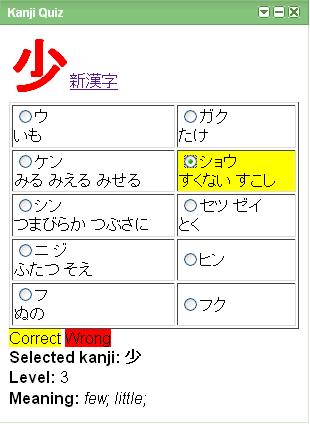
You can add it to your iGoogle page at this address:
http://tinyurl.com/kanjiquiz
Hope you enjoy it.
Here's its screenshot:
You can add it to your iGoogle page at this address:
http://tinyurl.com/kanjiquiz
Hope you enjoy it.
6:03 AM
Description: This add-on is used to look up word which is defined in iKnow! website. The word is extracted by using iKnow! developer API.
To install the add-on, follow these steps:
1. Open your FireFox browser, click to this link https://addons.mozilla.org/en-US/firefox/addon/9645 and open it with FireFox browser. This dialog will appear.
![[Image]](https://lh3.googleusercontent.com/blogger_img_proxy/AEn0k_sOzIyu3UgQCxOUzMEyv5rg7_fmd84-bKFqlblnFEPgBQnQiNXhcjgmoUbDIFv7zNMt8d63MBpLYyuWDpxRf9BcZpoGrn8BGXUfmsr5bQxZgFll-lW3TA=s0-d)
Click the button Install Now as described above.
2. After installing successfully, the new dialog will appear:
![[Image]](https://lh3.googleusercontent.com/blogger_img_proxy/AEn0k_vZHOzGis_UZjSYDRHQiB8W9oNpJAAvU_9r1zP8Q9VxYlwhcMm_2FaIHBgJfBb_r7nuOCrh9nROKTueyGtzfrxdHMe9l80KJbe3RvISb0hiaTr7aJLzDls=s0-d)
Click Restart FireFox to restart your FireFox browser.
3. After your FireFox browser is restarted, you notice that there's a new icon (red circle in the following picture) in the status bar
![[Image]](https://lh3.googleusercontent.com/blogger_img_proxy/AEn0k_tENd1acov1IBukqoyOdqpU43wVTfVFNGFmRUR02akYB_TRK3HVvK01CUp2iBkuNY1dMupQ3uSDzpKGr9Q7CAJ5-twgR6OFf_qJav1phtlF02fo2D6aNvY=s0-d)
4. Click on it, a pop-up menu will be opened:
![[Image]](https://lh3.googleusercontent.com/blogger_img_proxy/AEn0k_syaU0Y6OgjY5q-EHFqXsKZcsVajGYgNe5EI2LJaTLM-7xqcsZqp4YYPGM1y5mAFfNwe1jkHxLIBcPkRTY4VeJR_bKgBeJTXvzvHKlxjk4a1E9-XAz8Xy4=s0-d)
5. Click to Option... to configure your dictionary:
![[Image]](https://lh3.googleusercontent.com/blogger_img_proxy/AEn0k_tzSqx9qAdRUm1_I3J4sL1YvU3XlzzAMdtuN4eonZn8E-gB5EHPQq-VLeuhRC0KLccUdb0XcSsjQNUHOq9QzBaJmlMY4bE7pc8tD8V4oXQUuUTxjMAhQs8=s0-d)
To install the add-on, follow these steps:
1. Open your FireFox browser, click to this link https://addons.mozilla.org/en-US/firefox/addon/9645 and open it with FireFox browser. This dialog will appear.
Click the button Install Now as described above.
2. After installing successfully, the new dialog will appear:
Click Restart FireFox to restart your FireFox browser.
3. After your FireFox browser is restarted, you notice that there's a new icon (red circle in the following picture) in the status bar
4. Click on it, a pop-up menu will be opened:
For example, I configure by using Ctrl + Right Mouse to look up word.
I checked Load sentences to allow the add-on to load sentences related to the word (if any)
I checked Load sentence sound to allow the add-on to load sound of sentence related to the word (if any)
I checked Load sentence image to allow the add-on to load image of sentence related to the word (if any)
Click OK to finish.
6. OK, it's time to use it.
Open any web page, for example iKnow! website: www.iknow.co.jp
Press Ctrl button and click Right Mouse at the same time on the word you would like to look up.
For example, I press Ctrl + Right Mouse on the word spread, this screen will appear:
![[Image]](https://lh3.googleusercontent.com/blogger_img_proxy/AEn0k_s7eKBz8Omqbq07wvY6mFvdu0RpMoxMbINVDZ5mzRx3yEZvw0087UckXld1hETrJC6wB1DYFT8CYHO8CbYwlTDacbUFhe9ag6FkuuRKAyNIt_XhzwUReWM=s0-d)
Another example, I open BBC website and look up for the word negotiation
![[Image]](https://lh3.googleusercontent.com/blogger_img_proxy/AEn0k_thJKX5o1vs0S0XO5wznhg-ft1riz_neMidau0j-RfVzwGdFURV5caI65hzLXxt9c4e5N3_vPvqMunOOmwbBEyjzAUp1cUtjXcIPBXDi2EZQxstGlhkq0U=s0-d)
This add-on is quite simple at the moment, I'll try to upgrade it later.
Thanks and hope you enjoy it.
I checked Load sentences to allow the add-on to load sentences related to the word (if any)
I checked Load sentence sound to allow the add-on to load sound of sentence related to the word (if any)
I checked Load sentence image to allow the add-on to load image of sentence related to the word (if any)
Click OK to finish.
6. OK, it's time to use it.
Open any web page, for example iKnow! website: www.iknow.co.jp
Press Ctrl button and click Right Mouse at the same time on the word you would like to look up.
For example, I press Ctrl + Right Mouse on the word spread, this screen will appear:
Another example, I open BBC website and look up for the word negotiation
Thanks and hope you enjoy it.
5:36 AM
次の( )に適当な平仮名を一字書きなさい。
- バナナは、暑い地方(で)作られる。
- 農業の人は果物(に)農薬をかける。
- この定期券は、学生(で)無ければ、使えない。
- みかんは、暖かい地方(で)とれる。
- 「この本屋雑誌を棚の上(に)並べてください。」
- あまりタバコを吸う(と)、喉が痛くなる。
- とろぼうが入ってくる(の)を防ぐために、特別なかぎをつけた。
- 富士山は、日本で一番高い山(と)(し)(て)知られている。
- 必要なもの(だ)(け)を残して、他のものは、捨ててしまおう。
- 多く(の)人々が留学生のスピーチを聞くために集まって来た。


 Posts
Posts

